
We are excited to announce: Speakoala Online TTS is now officially live!
You can now enter text directly on the web, choose language and voice, then quickly generate natural speech for preview and download. No complex setup required.
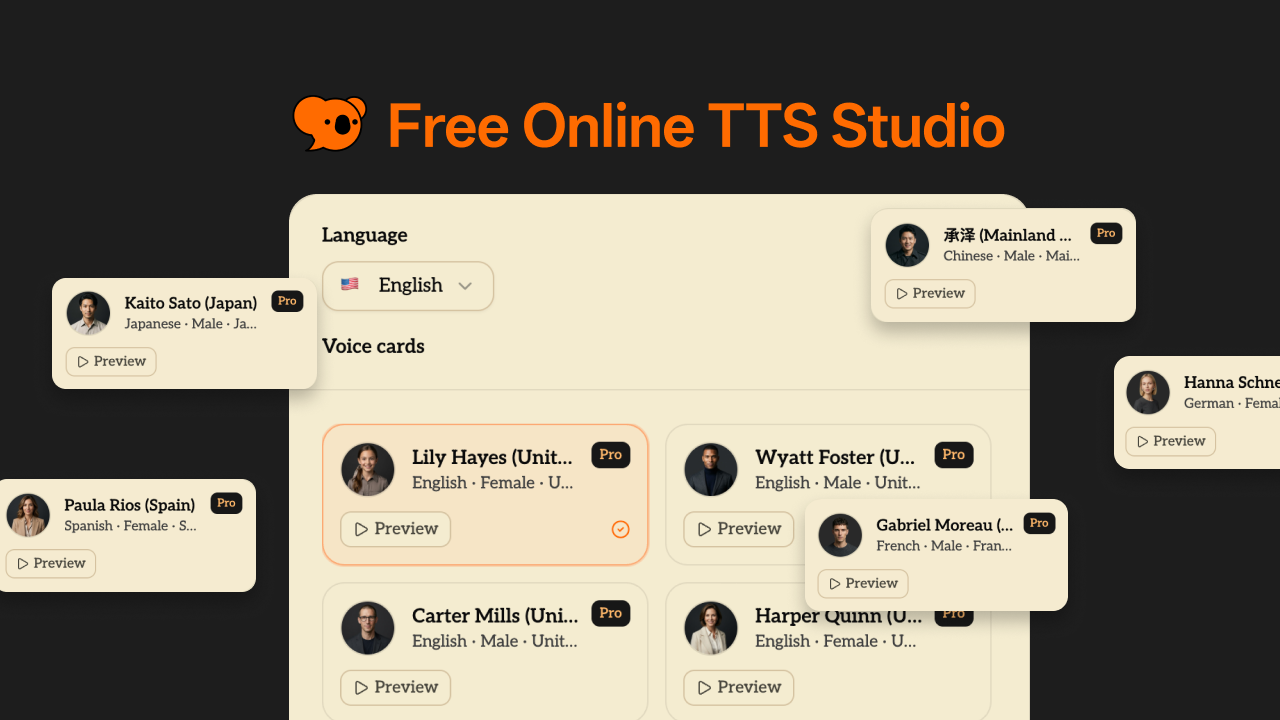
What is included in the Online TTS page
The new Online TTS page includes complete core capabilities:
- Enter text and generate speech in one click
- Filter voices by language
- Preview different voice styles
- Play and download generated audio as MP3
- Simple workflow for fast usage
Whether you need to listen to a quick paragraph or process larger content, you can get started immediately.
Language and voice coverage
Online TTS currently supports 70+ languages, including but not limited to:
- English
- Chinese
- Japanese
- Korean
- French
- German
- Spanish
- Arabic
- Cantonese
We also provide a wide range of voice styles and tones, so you can match different content scenarios with a more natural listening experience.
Practical use cases
Online TTS is especially useful for:
- Listening to articles, webpages, and documents
- Drafting voiceovers for videos and short content
- Language learning, including shadowing and listening practice
- Previewing speeches, podcasts, and course scripts
- Consuming information hands-free during daily tasks
You can treat it as a ready-to-use text reading tool anytime.
Free quota and member benefits
To make onboarding easier, we offer a straightforward plan:
- No login required: free daily usage quota for everyone
- Pro / Max users: unlimited usage
In short, light usage can start free right away, and heavy usage can scale smoothly with subscription plans.
Try it now
If you are looking for an easy, natural, and sustainable online text-to-speech tool, welcome to try Speakoala Online TTS now.
We would also love your feedback. Your most-used languages, preferred voices, and real use cases will help us make Online TTS even better.